

Monitor your repos with the ReleaseBytes GitHub App
Keep track of breaking changes and end-of-life dates for the providers, images and runtimes pinned in your repos. The app installs read-only and opens a GitHub Issue when something needs attention, with nothing to configure.
Two tiers
Installing needs no account: every install gets breaking-release and end-of-life Issues. Linking a Pro or Team account adds dependency lockfile scanning and the AI impact pass that names the file and line each breaking change hits. Sign in to see which tier your installs run on, or compare plans.
What it detects
Breaking provider releases past your pin
Reads every .terraform.lock.hcl in the repo, nested roots included, and takes the oldest pin per provider. When newer releases contain breaking changes, it opens one Issue per provider listing exactly what shipped since your pin, linked to the release notes and the ReleaseBytes analysis. Findings are filtered to the resources your Terraform actually declares: a breaking change that only touches resources you never use is dropped, and each match is cited in the Issue ("Breaking for your aws_kinesis_stream").
Where the change lands in your Terraform
For breaking changes that touch resources you declare, the Issue points at the declarations themselves — the file and line of each affected resource block, with what needs to change there. It reads your .tf files to find them, so the citations are to your Terraform, not to modules or generated code it cannot see.
Versions approaching end of life
Reads Dockerfile FROM lines, Terraform database_version declarations, and the direct dependencies in uv.lock, poetry.lock and package-lock.json, then resolves them against the key dates we track. Anything you run inside 90 days of end of life, or already past it, gets an Issue naming the file it was found in. Runtime pins cascade: a repo on Databricks Runtime 13.3 is told about the Python 3.10 deadline inside it.
There is nothing to configure: the repo is the config. Installing needs no account, and an unlinked install still gets breaking-release and end-of-life Issues; linking a ReleaseBytes account is only what turns on lockfile scanning and the line-cited analysis above. Findings come only from what each repository actually pins and declares, so a repo without Databricks never hears about Databricks, and a breaking change in a resource you never touch never becomes an Issue. EOL findings come from the same data as the Key Dates: one page of end-of-life dates for the cloud, data and AI stack, updated nightly.
What an Issue looks like
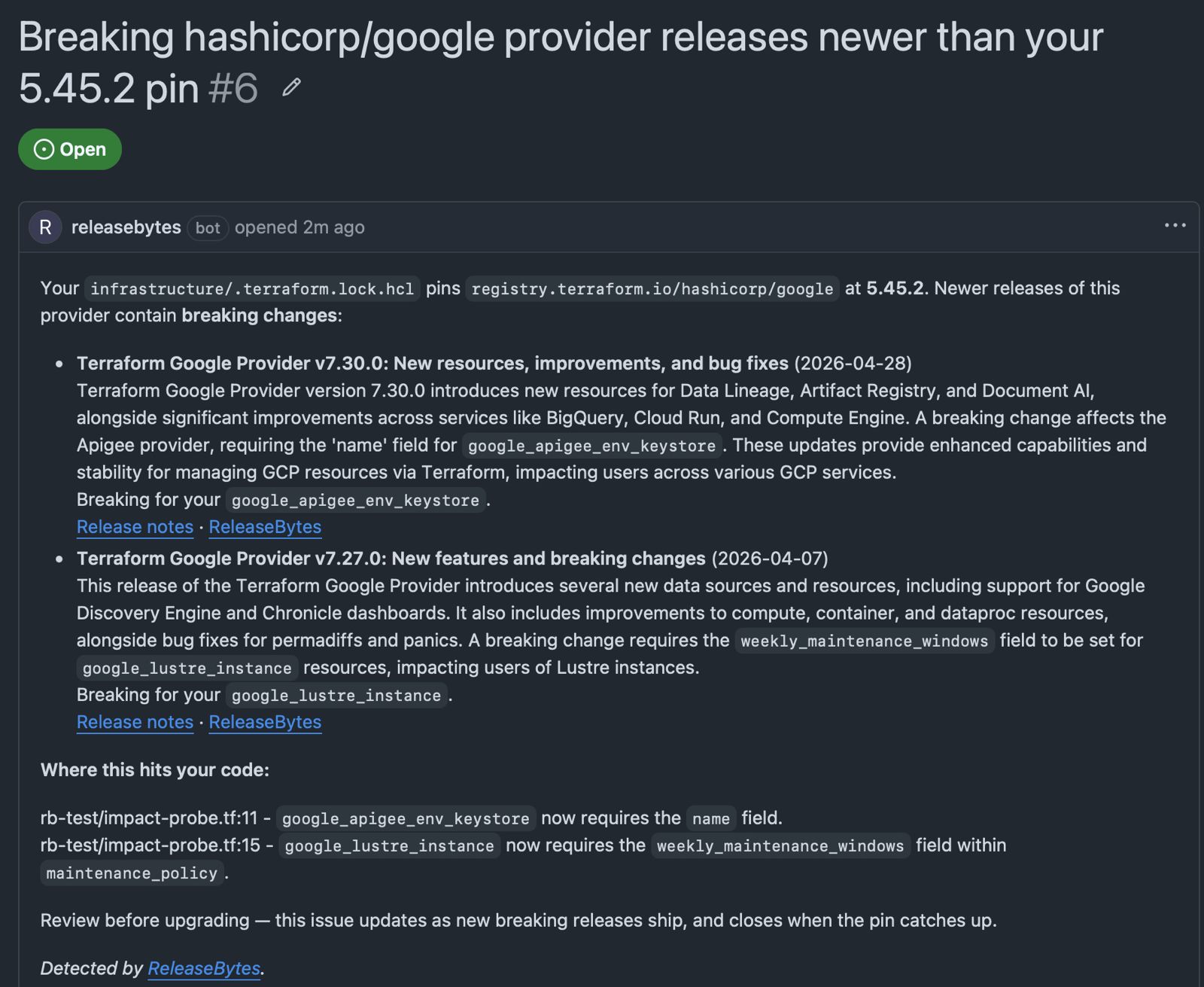
An enhanced Issue on Pro: releases since your pin, filtered to resources you declare, and the exact lines in your Terraform they land on. On Individual the same Issue arrives without the line citations.
What it covers today
| It reads | It detects |
|---|---|
| .terraform.lock.hcl | Breaking releases in pinned Terraform providers: AWS, Google Cloud, AzureRM, Cloudflare |
| Dockerfile | End-of-life base images: PostgreSQL, MySQL, MariaDB, Redis, Valkey, Python and other official images of products we track key dates for |
| *.tf | End-of-life managed versions: Cloud SQL (database_version, PostgreSQL and MySQL) and Databricks Runtime (spark_version on clusters and jobs) |
| databricks.yml | Databricks Runtime pins in asset bundles, including what the runtime carries: DBR 13.3 also surfaces its pinned Python 3.10 deadline |
Coverage grows toward what installed repos actually contain: anything the scanner meets but can't resolve is logged and prioritised. Running something we should detect? Tell us.
Built to not be noisy
- One Issue per finding, updated in place
Repeat scans update the existing Issue, never a duplicate.
- Issues close themselves
When your pin catches up or the version moves on, the next scan closes the Issue with a comment.
- Scans on your schedule and ours
Pushes touching Terraform or Dockerfiles trigger a rescan. An hourly sweep catches the rest — most findings appear because a release shipped or a date drew closer, not because anyone touched the repo, so a repo nobody has committed to in months is still checked.
- Quiet by default
A clean repo hears nothing. No weekly summaries, no digests. An Issue means something needs action.
- Read-only, always
Contents: read-only plus Issues: read-write. It can open and close Issues; it can never touch your code.
Read-only by construction
The app requests two permissions: Contents: read-only and Issues: read & write. That's the entire surface, enforced server-side by GitHub. It cannot push code, open pull requests or touch branches. It reads your lock files, Dockerfiles and Terraform; it writes Issues; nothing else.
Install it
Pick the repositories you want scanned; the first scan runs on install. If a repo is clean, you hear nothing. Which is the point.
Install the GitHub AppAlready installed? Every finding is one open Issue across all your repositories.